Clean or verbatim
Choose readable text for everyday use, or verbatim when quotations and exact wording must be preserved.
 Moskus AI
 REN / BY MOSKUS AI
Ren transcribes meetings, interviews, podcasts and lectures with Norwegian language models. Your audio stays on your Mac throughout.
Privacy first
Meetings, interviews and recordings can contain information that does not belong in an arbitrary cloud service. Ren runs both speech recognition and quality tools locally.
The result is a practical workflow for Norwegian audio: drop in the file, choose text style, written standard and speakers — and get a draft ready for human review.
Request a demonstration ↗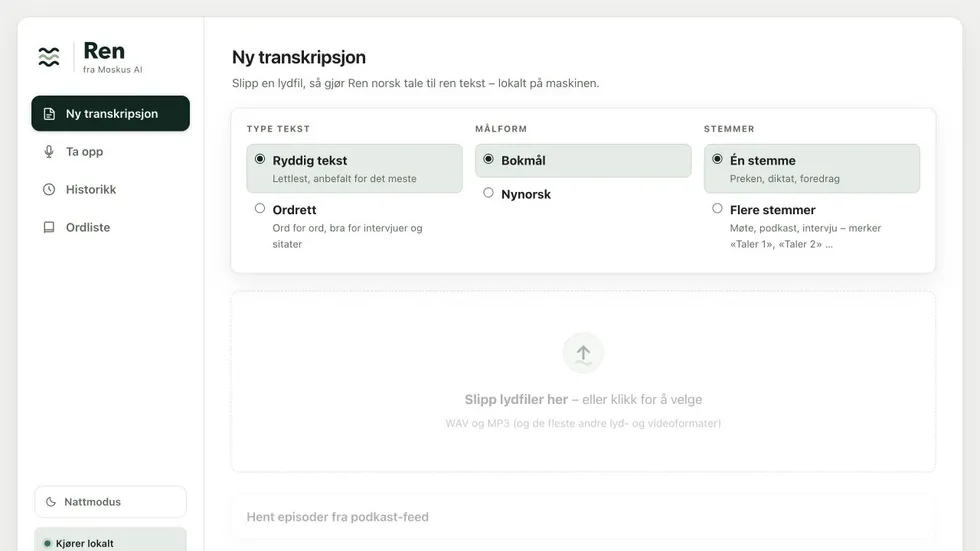
Made for Norwegian work
Choose readable text for everyday use, or verbatim when quotations and exact wording must be preserved.
Choose the written standard before processing, so the result is closer to the language you actually need.
Ren separates speakers in meetings, podcasts and interviews and labels them in the transcript.
Queue several episodes, or fetch them directly from an RSS feed and let Ren continue working.
Teach Ren your names and terminology. Possible mishearings are flagged, never silently changed.
Copy the text or download Word, plain text and subtitles with timestamps.
We start with a process you know and show how the product can fit your work.